Magic eraser
Erase anything from a photo
Brush over an object, or click it to select it, and LaMa fills the gap with what should be behind it.
$0.004
per run in the cloud
$0
on your own machine
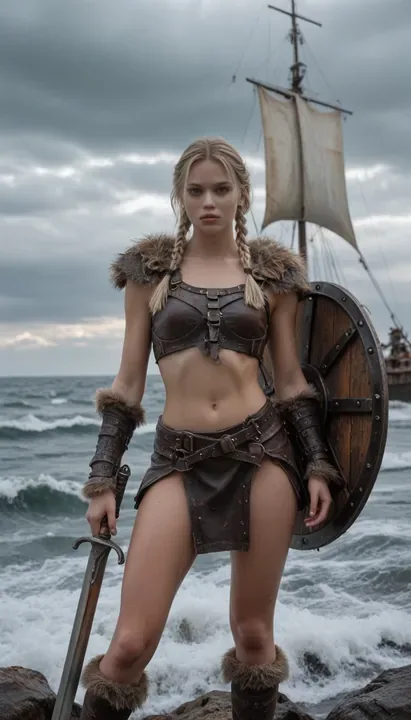
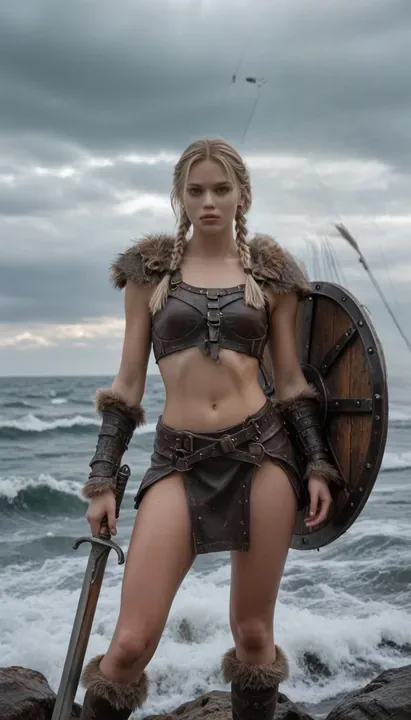
The ship and the boat on the right brushed over, one pass.
Brush or click
Paint over what to remove, or click it and the app selects it for you.
Fills that blend
The background is rebuilt from its surroundings, not smudged.
Offline and free
It runs on your computer, with no upload and no credits.
Reference
Inputs and parameters
The same on every surface: the desktop app, Claude through MCP and the API. Unknown parameters are refused, so a typo never runs with a default.
Inputs
| Name | Type | Limits | Notes |
|---|---|---|---|
| image required | image | 30 MB, 16 MP | Source image |
| mask required | mask | 30 MB, 16 MP | White = area to erase, same size as the image |
Parameters
| Name | Type | Default | Accepted | Notes |
|---|---|---|---|---|
| dilate | int | 8 | 0 to 64 | Grow the mask by this many pixels (catches edges and shadows). |
Outputs
- imageimage, png
API
Run Magic eraser from the API
curl https://imference.com/tools/erase-object \
  -H "Authorization: Bearer $IMFERENCE_API_KEY" \
  -F image=@image.png \
  -F mask=@mask.png
Files go in multipart fields named after the inputs; JSON works too, with {"inputs": {...}, "params": {...}} and https URLs or base64 data: URIs. The answer is a request_id: poll GET /status?request_id=... until it returns the outputs. Pay per call from a wallet instead at POST /ondemand/tools/erase-object. A run that fails is refunded to your credits. Details in the reference.
Specs
The details
- Price
- $0.004 · 4 credits
- Runs
- Local and cloud
- Download
- 208 MB, once
- License
- Apache-2.0
- Tool id
- erase-object 1.0.0
- MCP tool
- erase_object
More tools
Often used with it
Convert / compress
Convert to PNG, JPEG or WebP and set the compression quality.
$0.001
Crop
Crop an image to a rectangle or to an aspect ratio (centered).
$0.001
Describe image
Write a detailed caption of an image, ready to reuse as a prompt (Florence-2).
$0.002
Remove background
Cut out the subject: transparent PNG, a mask, or the subject on a solid color.
$0.003
FAQ
Good to know
How do I select what to erase?
Brush over it, or switch to select and click the object: the app draws the mask for you.
Does it work on large objects?
Yes, though it shines on objects up to a third of the frame. For big changes, try Edit with instructions.
Is it free?
Yes in the desktop app. In the API it is a few credits per run.